
• Skip to content
  • Skip to primary sidebar

Header Right

  • Home
  • About
  • Contact

Why Business Structure Matters

August 25, 2021 by Admin

two businessmen shaking  handsWhen you start a business, there are endless decisions to make. Among the most important is how to structure your business. Why is it so significant? Because the structure you choose will affect how your business is taxed and the degree to which you (and other owners) can be held personally liable. Here’s an overview of the various structures.

Sole Proprietorship

This is a popular structure for single-owner businesses. No separate business entity is formed, although the business may have a name (often referred to as a DBA, short for “doing business as”). A sole proprietorship does not limit liability, but insurance may be purchased.

You report your business income and expenses on Schedule C, an attachment to your personal income tax return (Form 1040). Net earnings the business generates are subject to both self-employment taxes and income taxes. Sole proprietors may have employees but don’t take paychecks themselves.

Limited Liability Company

If you want protection for your personal assets in the event your business is sued, you might prefer a limited liability company (LLC). An LLC is a separate legal entity that can have one or more owners (called “members”). Usually, income is taxed to the owners individually, and earnings are subject to self-employment taxes.

Note: It’s not unusual for lenders to require a small LLC’s owners to personally guarantee any business loans.

Corporation

A corporation is a separate legal entity that can transact business in its own name and files corporate income tax returns. Like an LLC, a corporation can have one or more owners (shareholders). Shareholders generally are protected from personal liability but can be held responsible for repaying any business debts they’ve personally guaranteed.

If you make a “Subchapter S” election, shareholders will be taxed individually on their share of corporate income. This structure generally avoids federal income taxes at the corporate level.

Partnership

In certain respects, a partnership is similar to an LLC or an S corporation. However, partnerships must have at least one general partner who is personally liable for the partnership’s debts and obligations. Profits and losses are divided among the partners and taxed to them individually.

Call Newton Sankey & Co. today at 631-474-2500. We’ll set up a free consultation to discuss your new venture and how we can assist with our new business advisor and incorporation experience.

Filed Under: Best Business Practices

How to Create Estimates in QuickBooks Online

July 19, 2021 by Admin

Businessman and woman working on computersWhether you sell products or services, you may need to create estimates in QuickBooks Online. Here’s how it’s done.
It would be nice if you could just instantly invoice every sale. But sometimes your customers need to know what a particular purchase will cost before they make the decision to buy. So you need to know how to create an estimate. If the sale goes through, you’ll of course want to send an invoice.

QuickBooks Online automates this entire process. It even helps you track the progress of your estimates by providing a special report. Here’s how it works.

Just Like An Invoice – Almost

The process of creating an estimate in QuickBooks Online is almost identical to creating an invoice. You click the New button in the upper left and select Estimate.

QuickBooks tips

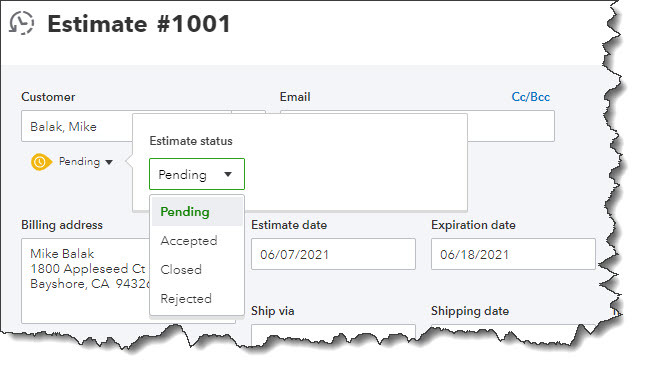
Creating an estimate in QuickBooks Online is like creating an invoice, with a few differences.

When the form opens, you’ll notice one difference right away. Directly below the Customer field, you’ll see the word Pending next to a small down arrow. Click it to see what your options are here. You’ll be able to update its status later. Select a Customer to get started. If this is a new customer, click + Add New and enter at least the name. If you want to build a more complete profile at this point, click Details and complete the fields in the window that opens. To send a carbon copy or blind copy of the estimate to someone else, click the Cc/Bcc link.

Next to the Estimate date, there’s a field for Expiration date. Enter that and continue on to add the products and/or services that will be included, just as you would on an invoice. If you’re generating an estimate for a new product or service, click + Add new in the drop-down list. A panel will slide out from the right that allows you to create one.

You’ll see more options for your estimate at the bottom of the page. You can add a message in the message box (or leave the default message if there is one). You can also Customize it, Make recurring, or Print or Preview it. When you’re satisfied, Save it, and send it to the customer.

QuickBooks tips

You can preview your estimate to see what the customer will see before saving it.

Updating the Status

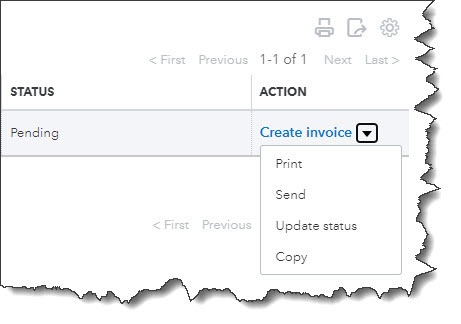
Your estimate will not be considered a transaction until you accept it. To do this, click the Sales link in the toolbar, then All Sales. Find your estimate in the list by looking in the Type column. Click the down arow next to Create invoice to see your other options there. You’ll see that you can Print or Send it or save a Copy.

Click Update status. In the window that opens, click the down arow next to Pending. From the list that drops down, select Accepted. You can also mark it Closed or Rejected. If you choose any of the last three options, another window opens that allows you to enter the name of the individual who authorized the action and the date it was done.

Click Create invoice if your estimate was accepted. You’ll have three options here. You can invoice your customer for:

  • The estimate total.
  • A percentage of each line item.
  • A custom amount for each line.

QuickBooks tips

When you locate your estimate on the Sales Transactions page, you’ll have several options for managing it.

After you’ve made your selection, click Create invoice to open the form with the amounts filled in based on your preference. Complete anything that’s unfinished but do not change any of the product or service line items. Save it, and your invoice is ready to go. You can always check the status of your estimates by running the Estimates by Customer report.

Creating and tracking estimates is as easy as working with invoices. You may run into difficulties, though, if you need to do anything beyond that point with estimates, such as modifying it and re-submitting them. We’re here to answer any questions you might have about this. It’s important that you get your estimates and their subsequent invoices exactly right, so you don’t lose money or sales. Let us know if you want to go over these concepts.

SOCIAL MEDIA POSTS

Do your customers want to know what something will cost before they order it? Create Estimates in QuickBooks Online.

Once you’ve had an Estimate approved by a customer using QuickBooks Online, you can turn it into an invoice.

Not sure what the status of all of your QuickBooks Online Estimates are? Run the Estimates by Customer report.

You can invoice customers for only a portion of an Estimate in QuickBooks Online. We can help you do this.

Using QuickBooks accounting software to track of your daily business transactions will help you organize expenses and manage cash flow, so you can be in control of your finances. Call Newton Sankey & Co. at 631-474-2500 to get started now or request your free consultation online.

Filed Under: QuickBooks

What You Need to Know About Incorporating Your Business

June 18, 2021 by Admin

Software engineers working on project and programming in companyIncorporating your small business the right way can bring tax benefits and protect your personal assets. Read on to learn more about what incorporation is, why you might want to incorporate, and how an accountant can help you navigate the questions that come with selecting the right business structure.

What is Incorporation?

When discussing “incorporation” in terms of a business, the term denotes how the business is organized or structured.

Regardless of the structure you choose for your business, incorporation is a legal process that brings your business into existence. The following are business structures commonly used in a small business.

Sole proprietorship

If you conduct business as an individual and do not register as any other type of business, you are a sole proprietor. With this business structure, your personal and business assets and liabilities are not separate. Sole proprietorships are relatively simple structures and a good choice for low-risk businesses or entrepreneurs testing a business idea. However, this business structure does not offer liability protection, so the owner is personally responsible for business debts and obligations. Another drawback is that it can be more challenging to get bank financing and business credit with this structure.

Partnership

When two or more individuals own a business together, the simplest structure is the partnership. There are limited partnerships (LP) and limited liability partnerships (LLP). LPs consist of a general partner with unlimited liability; the remaining partners have limited liability and limited control in the business. The partner without limited liability pays self-employment taxes. In LLPs, every owner has limited liability, protecting them from business debts and the actions of the other partners.

Partnerships can be a good choice for multiple-owned businesses and professional groups like physicians, attorneys, and veterinarians.

C-corp

Sometimes called a C-corp, a corporation is a separate legal entity from the business owner(s). The benefit of a corporation is that they offer the most robust protection for owners from personal liability; however, it costs more to form a corporation than it does to establish other business structures, and business profits are taxed at the personal and corporate level. Further, the record-keeping, operations, and reporting are more involved for a corporation. This structure is usually best for higher-risk businesses or those that raise money or plan to become publicly traded in the stock market.

S-corp

An S-corporation, or S-corp, is designed to avoid the double-taxation of a C-corp. This avoidance is possible because, in an S-corp, profits and some losses go through the owner’s personal income to avoid corporate taxes. S-corps are taxed differently in different states, so it is essential to have your accountant help you understand the guidelines and laws in your state.

LLC

A limited liability company (LLC) has the benefits of a corporation and a partnership. The owner is protected from personal liability in situations like bankruptcy or lawsuits and can avoid corporate taxes because profits and losses can pass through their personal income. However, there are self-employment taxes and Medicare and Social Security contributions since LLC members are considered self-employed.

An LLC is an option for owners with significant assets that need protection and who want the benefit of a lower tax rate than a corporation pays.

How to Incorporate

When you’re ready to incorporate your business, consult your trusted CPA or accountant so that you have a full view of what incorporating will mean for you and your business initially and for years to come.

Call Newton Sankey & Co. today at 631-474-2500. We’ll set up a free consultation to discuss your new venture and how we can assist with our new business advisor and incorporation experience.

Filed Under: Best Business Practices

Why You Need Year – Round Tax Planning…

May 20, 2021 by Admin

Business team busy at work…and tips on how to do it.

The IRS may have granted us a reprieve for filing our income taxes this year, but we hope you’re well into your preparation for 2020 income taxes – or finished with them. Tax planning shouldn’t be a task on your to-do list every April. It should start January 1.

You won’t know what legislation Congress will pass before December 31 that will affect your taxes, but the planning and recordkeeping you do throughout the year will help minimize last-minute panic and frustration. It can also reduce your total tax obligation.

There are other reasons why you should treat tax preparation as a part of your overall financial planning. As the year progresses and you monitor your income and expenses, you can make adjustments that will have impact on your tax bill.

If you’re filing an individual return, you need to learn how major life events like marriage, children, unexpected unemployment, a new side gig, or a change in home ownership will affect you, and how to adjust accordingly. If you have a small business, this attention to money in and money out is even more critical. You don’t want to come to the end of the year and discover that your income is significantly higher than the total of your expenses, and you haven’t paid nearly enough in estimated taxes.

Waiting until the last minute is unwise for other reasons. For example, you may learn that you’re missing critical documents like receipts and official tax forms from employers. Further, what happens if an emergency comes up in early April and you’re unable to finish? Yes, you can file for an extension, but that also requires that paperwork and possibly a payment be submitted by the deadline.

Year-round tax planning gives you the opportunity to control what you can while anticipating what could happen. Sometimes, tax legislation comes early in the year, like the American Rescue Plan did in 2021. You probably already know how that will affect your 2021 taxes. If you’re conscientious about your bookkeeping throughout the year, you’ll be in a better position to gauge how both tax law changes and your own unfolding financial situation might alter your tax obligation.

How Do You Plan for Taxes?

Here’s the best answer we can give you to that question: Treat every day like it’s April 14. You don’t have to scrutinize every single expense and determine its tax implications (though you should, for major purchases), but there are a number of ways you can prepare.

Consider using a financial software program or website, or at least Excel. If you’re filing individually, you can start tracking your income and expenses in a free service like Mint or pay to use, for example, Quicken or Simplifi. These applications allow you to import transactions from your financial institutions, categorize them so you know what is tax-related, and run reports that can help you in your tax preparation.

Develop a manual system for organizing your taxes. If you don’t want to go digital, visit an office supply store and invest in suitable paper or a ledger book, file folders, and anything else that you can dedicate to only tax-related documentation. Keep all receipts in one place.

Keep abreast of tax legislation. Tax law changes are reported in newspapers and magazines, on websites, and on television news. Pay close attention, especially to those that will affect you.

Change your withholding if necessary. If you’re a W-2 employee and you’re getting large refunds, talk to a benefits representative at your company about changing the number of allowances you claim. Refunds are nice, but you could be putting that money to use yourself during the year.

Look at IRS tax forms. If you’re taking on a side gig or starting your own small business as a sole proprietor in 2021, you’re going to want to acquaint yourself with the IRS Schedule C. You can look at the 2020 version now to see what information you’ll have to supply. Pay close attention to the types of expenses that are deductible and track them carefully. You might even look at the instructions.

Consult with a professional. This is an especially good idea if you’re starting a new business this year and/or you’ve experienced life changes that could affect your taxes. We can help you come up with a plan to prepare for tax filing throughout the year. With that in hand, we’d also be happy to do your tax preparation for you when the time comes. Contact us, and we’ll schedule some time to meet.

SOCIAL MEDIA POSTS

You may have just recently filed your 2020 income taxes, but it’s past time to start planning for 2021. Ask us how.

Starting a side gig or sole proprietorship in 2021? We can help you understand how very different your income taxes will be.

Leaving your 2021 income tax planning until 2022 is risky. Let us help you start that process now.

Do you have a system for tracking income and expenses? It can help you minimize your 2021 tax obligation through smart planning.

Are you an individual or business owner who’s interested in lowering your tax burden? Call us at 631-474-2500 and ask to speak to a tax accountant now or request a consultation online and we’ll contact you.

Filed Under: QuickBooks

The Most Common Payroll Errors Small Business Owners Make

April 20, 2021 by Admin

Newton Sankey & Co. QuickBooksPaying employees seems easy enough. Their hours are logged, and you sign the checks; however, there’s more to payroll than that, and overlooking these critical aspects of paying your employees can have costly consequences. Here are five common payroll errors small business owners make and how to prevent them.

1. Not Paying Taxes Year-Round

Not paying taxes year-round is especially critical for new business owners because most of us are used to paying taxes by the April 15th deadline each year. But remember, that is for individual taxpayers, not business owners. Business taxes are usually paid year-round quarterly. The IRS has a business tax payment schedule, and so does each state. Your tax payment frequency depends on payroll frequency, so be sure to check with your accountant to determine when and how much tax you need to pay on a federal and state level.

2. Misclassifying Employees

If you have employees and freelance contractors working for your small business, be sure to classify them correctly. When it comes to payroll, it can be costly if you don’t. For example, if you misclassify an employee as an independent contractor, you may underpay payroll tax and have to pay retroactive payroll taxes on that employee down the road. Remember, to classify a worker as an independent contractor they must be in business for themselves. If they are not, chances are they must be classified as an employee if they work for you. According to the IRS, an individual is an independent contractor if the payer has the right to control or direct only the work result, not what will be done or how it will be done. A person is not an independent contractor if they perform services controlled by an employer (i.e., what will be done and how it will be done). Even if the worker has freedom of action if the employer can legally control how the services are performed, that worker is an employee.

3. Not Considering Payroll Schedule

How often your employees are paid impacts your bottom line and your employees. Whether you pay employees weekly, every other week, or monthly, it is essential to know how your payroll schedule affects your cash flow. You should consider payroll processing fees, administrative costs associated with payroll, and employee needs. For example, weekly payroll is most costly for employers due to preparation frequency. Monthly payroll is less expensive for employers but the least preferred by workers. Each payroll schedule has its pros and cons, so it is a good idea to determine a payroll schedule that works for your business as well as your employees.

4. Keeping Up with Paperwork

For payroll, employers are legally required to maintain specific paperwork. For example, I-9 forms to verify that all employees are legally eligible to work in the United States, a W-4 form to determine each employee’s tax withholdings. Some states require new-hire reporting. Many documents such as new-hire paperwork can be filed directly by your payroll preparation company but be sure to ask and be up-to-date on your state’s laws regarding the paperwork that must be kept on file for employees.

5. Forgetting Bank Holidays

Remember, bank holidays – business days when banks are closed – are not considered business days when it comes to payroll processing, so you need to account for these. On bank holidays, direct deposits are not made. This isn’t always a concern; however, if your payroll schedule falls on a bank holiday, it could cause your employees some aggravation. To avoid these issues, check the bank holidays for the year and plan accordingly in advance.


Remember to consult your trusted accountant or CPA for more on these payroll errors and others. Laws and regulations are ever-changing, so it pays to stay abreast of those to avoid potentially costly payroll errors for your small business.

Request a free consultation through our website now and we’ll contact you set up an appointment.

Filed Under: Best Business Practices

5 Resolutions QuickBooks Online Users Should Make for 2021

March 15, 2021 by Admin

New year, new challenges, and the potential for new successes. Here are five ways you can improve your financial management in 2021.

A painful year is drawing to a close. We’ll still be dealing with COVID-19 and a struggling economy in early 2021, but there’s hope on the horizon. There’s a lot you can’t control about the difficulties facing our country, but you can take control of your corner of it, especially in terms of how you manage your finances.

If you’re already using QuickBooks Online, you know how it’s solved the paperwork confusion of the past. But are you taking advantage of all of its capabilities? As you turn your digital calendar to January, consider expanding your use of the website to set yourself up for success in the new year. Here are five features to explore if you haven’t already.

Practice Proactive Reconciliation

QuickBooks Online’s Banking screen display registers for the bank and credit card transactions that have been posted by your banks. Do you review these frequently? It’s easy, and it’s important. It will save time when you do your monthly reconciliations with your bank statements. Hover over Transactions in the toolbar and select Banking. You can see some of your transaction management options in the image below.


When your statement comes and you’re ready to reconcile, you can use QuickBooks Online’s tools that take you step by step through the process. Hover over Accounting in the toolbar and select Reconcile. Let us know if you need help with reconciliation or with managing downloaded transactions.

Start Accepting Online Payments

This is probably the #1 way to encourage customers to pay you faster. When you set up a merchant account through QuickBooks Payments, you’re be able to accept credit cards, debit cards, and ACH bank transfers. Your invoices will include a Pay Now button and will contain the information your customers need to pay electronically. Their funds will go into your bank account.

There are other ways they can pay you directly. You can take their card numbers over the phone. You can also get a free card reader from Intuit and swipe their cards on your mobile device. And you can set up recurring payments that will occur automatically. There are no base fees – you just pay per transaction.

Set Weekly and Monthly Report Schedules

You may just run reports in QuickBooks Online as you need them. Some reports, though, should be created every week at a minimum, like Accounts receivable aging (detail or summary), Accounts Payable Aging, Open invoices, and Unpaid Bills. There are many others, but you need to keep a close watch on what you owe and who owes you.


It’s important to run some other reports on a monthly (or, sometimes, quarterly) basis, including Balance Sheet, Profit and Loss, and Statement of Cash Flows. Rather than just providing snapshots of where you stand with money coming in and going out, they give you a more comprehensive view of your finances that can help you make better business decisions. They’re complex and often difficult to analyze, though, which is why QuickBooks Online categorizes them as For my accountant. We can create and interpret these for you.

Expand QuickBooks Online’s Features by Using Apps

QuickBooks Online is generic enough that it can be used by a wide variety of small businesses. But that flexibility may mean that it’s not quite robust enough in one area or another, like inventory management or time tracking. There are hundreds of apps that you can integrate with QuickBooks Online to fill in the gaps. Some are free. Click on Apps in the toolbar. Again, we’re available to help if you need assistance.

Evaluate the Cost-effectiveness of Your Vendors

It’s easy to stick with the same old suppliers because it’s a hassle to change. But so many companies are hurting because of the pandemic that you may find you can get what you need for less. To go over your whole list, hover over Expenses in the toolbar and click on Vendors. You might clean up your list while you’re at it. Click the down arrow at the end of each row and select Make inactive if you haven’t ordered from specific suppliers over the last year.

As we said earlier, we’re available to meet with you and explain any of the concepts discussed here in more depth. It’s still a hard time for so many small businesses, and we want to be of help wherever we can.

SOCIAL MEDIA POSTS

Don’t have a budget set for your business? QuickBooks Online has tools that can simplify the process of creating one.

When you’re creating a budget, it’s helpful to distinguish between essential and non-essential expenses. QuickBooks Online has tools that can help you, including budgeting for necessities first.

When was the last time you shopped for new suppliers? Now is a good time to see if you could save some money and help with your budget. QuickBooks Online has many tools that can help both you and your business budget.

Did you know QuickBooks Online allows you to use existing income and expense data to create a budget? Here is how this is done.

Call Newton Sankey & Co. at 631-474-2500 to get started now or request your free consultation online.

Filed Under: QuickBooks

  • « Previous Page
  • Page 1
  • …
  • Page 8
  • Page 9
  • Page 10
  • Page 11
  • Page 12
  • …
  • Page 15
  • Next Page »

Primary Sidebar

Search

Archive

  • February 2026
  • January 2026
  • December 2025
  • November 2025
  • October 2025
  • September 2025
  • August 2025
  • July 2025
  • June 2025
  • May 2025
  • April 2025
  • March 2025
  • February 2025
  • January 2025
  • December 2024
  • November 2024
  • October 2024
  • September 2024
  • August 2024
  • July 2024
  • June 2024
  • May 2024
  • April 2024
  • March 2024
  • February 2024
  • January 2024
  • December 2023
  • November 2023
  • October 2023
  • September 2023
  • August 2023
  • July 2023
  • June 2023
  • May 2023
  • April 2023
  • March 2023
  • February 2023
  • January 2023
  • December 2022
  • November 2022
  • October 2022
  • September 2022
  • August 2022
  • July 2022
  • June 2022
  • May 2022
  • April 2022
  • March 2022
  • February 2022
  • January 2022
  • December 2021
  • November 2021
  • October 2021
  • September 2021
  • August 2021
  • July 2021
  • June 2021
  • May 2021
  • April 2021
  • March 2021
  • February 2021
  • January 2021
  • December 2020
  • November 2020
  • October 2020
  • August 2020
  • July 2020
  • June 2020
  • May 2020
  • April 2020
  • March 2020
  • February 2020
  • January 2020
  • December 2019
  • November 2019
  • October 2019
  • September 2019
  • August 2019
  • July 2019
  • June 2019
  • May 2019
  • April 2019
  • March 2019
  • February 2019
  • January 2019

Category

  • Best Business Practices
  • Estate and Trusts
  • Individual Tax
  • Investment
  • Payroll Tax
  • QuickBooks
  • Real Estate
  • Retirement
  • Tax Articles
  • Uncategorized

Copyright © 2021 · https://www.newtonsankey.com/blog