• Skip to content
  • Skip to primary sidebar

Header Right

  • Home
  • About
  • Contact

The Top 3 Reasons to Outsource Your Accounting

October 20, 2021 by Admin

While you may think it’s better to take care of your small business accounting tasks in-house, you may be surprised to know that your business can benefit from having a professional accountant or CPA handle the job for you. Here are the top three reasons to outsource your accounting.

1. Peace of Mind

The number one reason for outsourcing your accounting is the peace of mind you will get regarding managing your accounting records. A qualified accountant or CPA on your team allows you to gain access to their professional knowledge and experience. Further, you can even choose an accountant that specializes in your unique business needs. A professional can help you keep your business records accurate and up-to-date. For example, payroll and tax documents will be maintained appropriately and submitted promptly. Timely and accurate accounting reduces your risk of penalties resulting from inaccurate record-keeping or lack of knowledge regarding aspects of accounting like tax laws and deadlines.

2. Focus on Business Development

When you enlist the services of a qualified accountant or CPA to manage your small business accounting needs, you minimize the time that you or your senior staff must spend performing or micromanaging those tasks. Freeing up your time in those areas enhances your ability to maintain a keen focus on the day-to-day tasks your business faces and any additional business needs that arise. Being able to focus your time on managing and growing your business, you improve operational efficiency. As you develop strategic goals, you can convey those to your outsourced accountant to garner their professional guidance and support when executing and realizing those goals.

3. Save Money

Many small business owners feel that handling accounting tasks in-house is more cost-effective because they can utilize existing staff. However, consider the total cost involved in hiring or training a staff member to manage your business’s accounting needs. There is also the associated time expenditure related to supervising an employee who manages the accounting. For a dedicated in-house staff member to handle the task, you must consider the additional costs of payroll, payroll taxes, and employee benefits. There is also employee turnover to consider, which, if high, could lead to additional training and expenses. By not electing to have a full-time dedicated employee handle accounting in-house, you also save on space and technology required to accommodate that individual.

For these reasons – and more such as getting timely financial advice, understanding cash flow, and maximizing your tax savings opportunities – it’s time to outsource your business’s accounting needs. What you gain far outweighs the cost.


Contact our firm to find out how we can create a package of accounting services for your small business.

Filed Under: Best Business Practices

Are You Tracking Absolutely All of Your Tax-Related Business Expenses?

September 20, 2021 by Admin

If you’re self-employed, understanding what’s deductible and recording all of your business expenses should be priorities.


When you work for yourself, accurate accounting is critical. The IRS pays special attention to tax returns prepared by sole proprietors. Not only does the agency try to determine whether all taxable income has been recorded, but they also scrutinize business expenses that are claimed, since some taxpayers blur the lines between personal and business purchases.

We’re not suggesting you hold anything back when you’re tracking your tax-deductible business expenses. We want you to claim every penny that the IRS says is permissible. This is especially important if your company makes a lot of money. You’ll need to document everything you can to offset your income and minimize your tax obligation.

How do you ensure that all of the money you’re spending to make money ends up somewhere on your IRS Schedule C? Let’s look at steps you can take.

Review the Schedule C

tax tips

The actual IRS Schedule C form contains broad expense categories. You may need to dig into deeper explanations of them.

If you’ve never completed a Schedule C before, it’s especially important that you familiarize yourself with it. You can view a copy of the 2020 version here. Pay special attention to Part II Expenses. The form breaks down business expenses into specific categories. But what’s the difference between Office expenses and Supplies? What does Other business property mean? Not only do you have to know which expenses are deductible, but you must be sure to include them in the right category.

The IRS has a special publication devoted to discussion of deductible business expenses. You’ll find links to it here. It’s a lengthy document, but there’s an interactive table of contents that lets you jump right to the section you want. You don’t have to read the whole thing, but you might bookmark it so you can consult it when you have a question. There are many questions on the Schedule C that may require additional explanation.

You might want to visit the IRS instructions online. This page displays a detailed outline of the form, section by section and line by line, so you can find what you’re looking for easily and click a link to get there.

Keep Detailed Records

This will be challenging if you’re doing your bookkeeping manually. You’ll need to set up a system of folders or envelopes or whatever works for you and separate receipts by either month or Schedule C category. If you know your way around Excel, you could set up a spreadsheet divided by category and enter receipt information as it comes in. This will make calculations easier, too.

Do make notes on your receipts so you’ll know why you thought the purchases would be deductible. You might also indicate whether the receipt was already entered in your master list, so you don’t have duplicate entries. Don’t forget about credit card charges and checks you’ve written for tax-deductible purchases that didn’t generate a receipt. Enter them in your master list as you go. If you’re ever audited, you’ll need copies of them for documentation. If you get electronic receipts in email, save them in a folder on your computer and record them.

tax tips

You can categorize your tax-related business expenses using personal finance or accounting applications.

There are numerous personal finance and small business accounting applications that allow you to import your online banking transactions and categorize them. These include QuickBooks (online and desktop), Mint, Quicken, and Simplifi by Quicken. Their category lists can often be modified, so you can make sure your tax-related expenses are organized accurately.

Don’t Dismiss the Unusual

There are some legitimate tax deductions that the IRS doesn’t necessarily include in the Schedule C instructions, but which it will accept. For example, H&R Block reported on a case where the cost of cat food was considered a business deduction (a scrapyard was trying to attract wild cats to keep snakes away). A professional bodybuilder was able to claim his purchase of ProTan Muscle Juice Professional Posing Oil as an acceptable business expense.

We’re not recommending that you spend a great deal of time looking for obscure tax deductions. But think about your purchases as you make them to see if they’re tax-worthy.

All of these suggestions may sound time-consuming. They can be, until you get into the habit of tracking all of your tax-related business expenses, but it does require constant diligence. We can help ensure that you’re only claiming legitimate deductions and advise you on those you might question. We can also prepare and file your return for you and/or help with year-round tax planning. Contact us for a consultation.

SOCIAL MEDIA POSTS

If 2021 is your first year as a sole proprietor, you’re likely to find income tax preparation challenging. Contact us for help with this.

Filing an IRS Schedule C requires careful, year-round bookkeeping. We can help you set up a system for tracking business expenses.

Before you can file an IRS Schedule C, you need to understand this complex form. Let us help you learn what’s needed.

There are numerous financial applications that let you import bank transactions and categorize them for tax purposes. Ask us.

Are you an individual or business owner who’s interested in lowering your tax burden? Call us at 631-474-2500 and ask to speak to a tax accountant now or request a consultation online and we’ll contact you.

Filed Under: Individual Tax

Why Business Structure Matters

August 25, 2021 by Admin

two businessmen shaking  handsWhen you start a business, there are endless decisions to make. Among the most important is how to structure your business. Why is it so significant? Because the structure you choose will affect how your business is taxed and the degree to which you (and other owners) can be held personally liable. Here’s an overview of the various structures.

Sole Proprietorship

This is a popular structure for single-owner businesses. No separate business entity is formed, although the business may have a name (often referred to as a DBA, short for “doing business as”). A sole proprietorship does not limit liability, but insurance may be purchased.

You report your business income and expenses on Schedule C, an attachment to your personal income tax return (Form 1040). Net earnings the business generates are subject to both self-employment taxes and income taxes. Sole proprietors may have employees but don’t take paychecks themselves.

Limited Liability Company

If you want protection for your personal assets in the event your business is sued, you might prefer a limited liability company (LLC). An LLC is a separate legal entity that can have one or more owners (called “members”). Usually, income is taxed to the owners individually, and earnings are subject to self-employment taxes.

Note: It’s not unusual for lenders to require a small LLC’s owners to personally guarantee any business loans.

Corporation

A corporation is a separate legal entity that can transact business in its own name and files corporate income tax returns. Like an LLC, a corporation can have one or more owners (shareholders). Shareholders generally are protected from personal liability but can be held responsible for repaying any business debts they’ve personally guaranteed.

If you make a “Subchapter S” election, shareholders will be taxed individually on their share of corporate income. This structure generally avoids federal income taxes at the corporate level.

Partnership

In certain respects, a partnership is similar to an LLC or an S corporation. However, partnerships must have at least one general partner who is personally liable for the partnership’s debts and obligations. Profits and losses are divided among the partners and taxed to them individually.

Call Newton Sankey & Co. today at 631-474-2500. We’ll set up a free consultation to discuss your new venture and how we can assist with our new business advisor and incorporation experience.

Filed Under: Best Business Practices

How to Create Estimates in QuickBooks Online

July 19, 2021 by Admin

Businessman and woman working on computersWhether you sell products or services, you may need to create estimates in QuickBooks Online. Here’s how it’s done.
It would be nice if you could just instantly invoice every sale. But sometimes your customers need to know what a particular purchase will cost before they make the decision to buy. So you need to know how to create an estimate. If the sale goes through, you’ll of course want to send an invoice.

QuickBooks Online automates this entire process. It even helps you track the progress of your estimates by providing a special report. Here’s how it works.

Just Like An Invoice – Almost

The process of creating an estimate in QuickBooks Online is almost identical to creating an invoice. You click the New button in the upper left and select Estimate.

QuickBooks tips

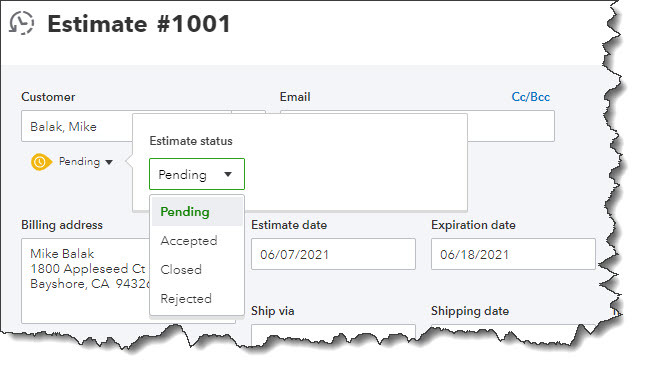
Creating an estimate in QuickBooks Online is like creating an invoice, with a few differences.

When the form opens, you’ll notice one difference right away. Directly below the Customer field, you’ll see the word Pending next to a small down arrow. Click it to see what your options are here. You’ll be able to update its status later. Select a Customer to get started. If this is a new customer, click + Add New and enter at least the name. If you want to build a more complete profile at this point, click Details and complete the fields in the window that opens. To send a carbon copy or blind copy of the estimate to someone else, click the Cc/Bcc link.

Next to the Estimate date, there’s a field for Expiration date. Enter that and continue on to add the products and/or services that will be included, just as you would on an invoice. If you’re generating an estimate for a new product or service, click + Add new in the drop-down list. A panel will slide out from the right that allows you to create one.

You’ll see more options for your estimate at the bottom of the page. You can add a message in the message box (or leave the default message if there is one). You can also Customize it, Make recurring, or Print or Preview it. When you’re satisfied, Save it, and send it to the customer.

QuickBooks tips

You can preview your estimate to see what the customer will see before saving it.

Updating the Status

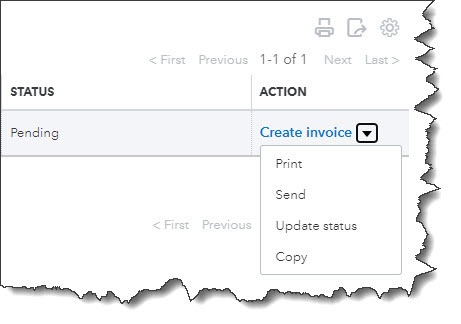
Your estimate will not be considered a transaction until you accept it. To do this, click the Sales link in the toolbar, then All Sales. Find your estimate in the list by looking in the Type column. Click the down arow next to Create invoice to see your other options there. You’ll see that you can Print or Send it or save a Copy.

Click Update status. In the window that opens, click the down arow next to Pending. From the list that drops down, select Accepted. You can also mark it Closed or Rejected. If you choose any of the last three options, another window opens that allows you to enter the name of the individual who authorized the action and the date it was done.

Click Create invoice if your estimate was accepted. You’ll have three options here. You can invoice your customer for:

  • The estimate total.
  • A percentage of each line item.
  • A custom amount for each line.

QuickBooks tips

When you locate your estimate on the Sales Transactions page, you’ll have several options for managing it.

After you’ve made your selection, click Create invoice to open the form with the amounts filled in based on your preference. Complete anything that’s unfinished but do not change any of the product or service line items. Save it, and your invoice is ready to go. You can always check the status of your estimates by running the Estimates by Customer report.

Creating and tracking estimates is as easy as working with invoices. You may run into difficulties, though, if you need to do anything beyond that point with estimates, such as modifying it and re-submitting them. We’re here to answer any questions you might have about this. It’s important that you get your estimates and their subsequent invoices exactly right, so you don’t lose money or sales. Let us know if you want to go over these concepts.

SOCIAL MEDIA POSTS

Do your customers want to know what something will cost before they order it? Create Estimates in QuickBooks Online.

Once you’ve had an Estimate approved by a customer using QuickBooks Online, you can turn it into an invoice.

Not sure what the status of all of your QuickBooks Online Estimates are? Run the Estimates by Customer report.

You can invoice customers for only a portion of an Estimate in QuickBooks Online. We can help you do this.

Using QuickBooks accounting software to track of your daily business transactions will help you organize expenses and manage cash flow, so you can be in control of your finances. Call Newton Sankey & Co. at 631-474-2500 to get started now or request your free consultation online.

Filed Under: QuickBooks

What You Need to Know About Incorporating Your Business

June 18, 2021 by Admin

Software engineers working on project and programming in companyIncorporating your small business the right way can bring tax benefits and protect your personal assets. Read on to learn more about what incorporation is, why you might want to incorporate, and how an accountant can help you navigate the questions that come with selecting the right business structure.

What is Incorporation?

When discussing “incorporation” in terms of a business, the term denotes how the business is organized or structured.

Regardless of the structure you choose for your business, incorporation is a legal process that brings your business into existence. The following are business structures commonly used in a small business.

Sole proprietorship

If you conduct business as an individual and do not register as any other type of business, you are a sole proprietor. With this business structure, your personal and business assets and liabilities are not separate. Sole proprietorships are relatively simple structures and a good choice for low-risk businesses or entrepreneurs testing a business idea. However, this business structure does not offer liability protection, so the owner is personally responsible for business debts and obligations. Another drawback is that it can be more challenging to get bank financing and business credit with this structure.

Partnership

When two or more individuals own a business together, the simplest structure is the partnership. There are limited partnerships (LP) and limited liability partnerships (LLP). LPs consist of a general partner with unlimited liability; the remaining partners have limited liability and limited control in the business. The partner without limited liability pays self-employment taxes. In LLPs, every owner has limited liability, protecting them from business debts and the actions of the other partners.

Partnerships can be a good choice for multiple-owned businesses and professional groups like physicians, attorneys, and veterinarians.

C-corp

Sometimes called a C-corp, a corporation is a separate legal entity from the business owner(s). The benefit of a corporation is that they offer the most robust protection for owners from personal liability; however, it costs more to form a corporation than it does to establish other business structures, and business profits are taxed at the personal and corporate level. Further, the record-keeping, operations, and reporting are more involved for a corporation. This structure is usually best for higher-risk businesses or those that raise money or plan to become publicly traded in the stock market.

S-corp

An S-corporation, or S-corp, is designed to avoid the double-taxation of a C-corp. This avoidance is possible because, in an S-corp, profits and some losses go through the owner’s personal income to avoid corporate taxes. S-corps are taxed differently in different states, so it is essential to have your accountant help you understand the guidelines and laws in your state.

LLC

A limited liability company (LLC) has the benefits of a corporation and a partnership. The owner is protected from personal liability in situations like bankruptcy or lawsuits and can avoid corporate taxes because profits and losses can pass through their personal income. However, there are self-employment taxes and Medicare and Social Security contributions since LLC members are considered self-employed.

An LLC is an option for owners with significant assets that need protection and who want the benefit of a lower tax rate than a corporation pays.

How to Incorporate

When you’re ready to incorporate your business, consult your trusted CPA or accountant so that you have a full view of what incorporating will mean for you and your business initially and for years to come.

Call Newton Sankey & Co. today at 631-474-2500. We’ll set up a free consultation to discuss your new venture and how we can assist with our new business advisor and incorporation experience.

Filed Under: Best Business Practices

Why You Need Year – Round Tax Planning…

May 20, 2021 by Admin

Business team busy at work…and tips on how to do it.

The IRS may have granted us a reprieve for filing our income taxes this year, but we hope you’re well into your preparation for 2020 income taxes – or finished with them. Tax planning shouldn’t be a task on your to-do list every April. It should start January 1.

You won’t know what legislation Congress will pass before December 31 that will affect your taxes, but the planning and recordkeeping you do throughout the year will help minimize last-minute panic and frustration. It can also reduce your total tax obligation.

There are other reasons why you should treat tax preparation as a part of your overall financial planning. As the year progresses and you monitor your income and expenses, you can make adjustments that will have impact on your tax bill.

If you’re filing an individual return, you need to learn how major life events like marriage, children, unexpected unemployment, a new side gig, or a change in home ownership will affect you, and how to adjust accordingly. If you have a small business, this attention to money in and money out is even more critical. You don’t want to come to the end of the year and discover that your income is significantly higher than the total of your expenses, and you haven’t paid nearly enough in estimated taxes.

Waiting until the last minute is unwise for other reasons. For example, you may learn that you’re missing critical documents like receipts and official tax forms from employers. Further, what happens if an emergency comes up in early April and you’re unable to finish? Yes, you can file for an extension, but that also requires that paperwork and possibly a payment be submitted by the deadline.

Year-round tax planning gives you the opportunity to control what you can while anticipating what could happen. Sometimes, tax legislation comes early in the year, like the American Rescue Plan did in 2021. You probably already know how that will affect your 2021 taxes. If you’re conscientious about your bookkeeping throughout the year, you’ll be in a better position to gauge how both tax law changes and your own unfolding financial situation might alter your tax obligation.

How Do You Plan for Taxes?

Here’s the best answer we can give you to that question: Treat every day like it’s April 14. You don’t have to scrutinize every single expense and determine its tax implications (though you should, for major purchases), but there are a number of ways you can prepare.

Consider using a financial software program or website, or at least Excel. If you’re filing individually, you can start tracking your income and expenses in a free service like Mint or pay to use, for example, Quicken or Simplifi. These applications allow you to import transactions from your financial institutions, categorize them so you know what is tax-related, and run reports that can help you in your tax preparation.

Develop a manual system for organizing your taxes. If you don’t want to go digital, visit an office supply store and invest in suitable paper or a ledger book, file folders, and anything else that you can dedicate to only tax-related documentation. Keep all receipts in one place.

Keep abreast of tax legislation. Tax law changes are reported in newspapers and magazines, on websites, and on television news. Pay close attention, especially to those that will affect you.

Change your withholding if necessary. If you’re a W-2 employee and you’re getting large refunds, talk to a benefits representative at your company about changing the number of allowances you claim. Refunds are nice, but you could be putting that money to use yourself during the year.

Look at IRS tax forms. If you’re taking on a side gig or starting your own small business as a sole proprietor in 2021, you’re going to want to acquaint yourself with the IRS Schedule C. You can look at the 2020 version now to see what information you’ll have to supply. Pay close attention to the types of expenses that are deductible and track them carefully. You might even look at the instructions.

Consult with a professional. This is an especially good idea if you’re starting a new business this year and/or you’ve experienced life changes that could affect your taxes. We can help you come up with a plan to prepare for tax filing throughout the year. With that in hand, we’d also be happy to do your tax preparation for you when the time comes. Contact us, and we’ll schedule some time to meet.

SOCIAL MEDIA POSTS

You may have just recently filed your 2020 income taxes, but it’s past time to start planning for 2021. Ask us how.

Starting a side gig or sole proprietorship in 2021? We can help you understand how very different your income taxes will be.

Leaving your 2021 income tax planning until 2022 is risky. Let us help you start that process now.

Do you have a system for tracking income and expenses? It can help you minimize your 2021 tax obligation through smart planning.

Are you an individual or business owner who’s interested in lowering your tax burden? Call us at 631-474-2500 and ask to speak to a tax accountant now or request a consultation online and we’ll contact you.

Filed Under: QuickBooks

  • « Previous Page
  • Page 1
  • …
  • Page 8
  • Page 9
  • Page 10
  • Page 11
  • Page 12
  • …
  • Page 15
  • Next Page »

Primary Sidebar

Search

Archive

  • May 2026
  • March 2026
  • February 2026
  • January 2026
  • December 2025
  • November 2025
  • October 2025
  • September 2025
  • August 2025
  • July 2025
  • June 2025
  • May 2025
  • April 2025
  • March 2025
  • February 2025
  • January 2025
  • December 2024
  • November 2024
  • October 2024
  • September 2024
  • August 2024
  • July 2024
  • June 2024
  • May 2024
  • April 2024
  • March 2024
  • February 2024
  • January 2024
  • December 2023
  • November 2023
  • October 2023
  • September 2023
  • August 2023
  • July 2023
  • June 2023
  • May 2023
  • April 2023
  • March 2023
  • February 2023
  • January 2023
  • December 2022
  • November 2022
  • October 2022
  • September 2022
  • August 2022
  • July 2022
  • June 2022
  • May 2022
  • April 2022
  • March 2022
  • February 2022
  • January 2022
  • December 2021
  • November 2021
  • October 2021
  • September 2021
  • August 2021
  • July 2021
  • June 2021
  • May 2021
  • April 2021
  • March 2021
  • February 2021
  • January 2021
  • December 2020
  • November 2020
  • October 2020
  • August 2020
  • July 2020
  • June 2020
  • May 2020
  • April 2020
  • March 2020
  • February 2020
  • January 2020
  • December 2019
  • November 2019
  • October 2019
  • September 2019
  • August 2019
  • July 2019
  • June 2019
  • May 2019
  • April 2019
  • March 2019
  • February 2019
  • January 2019

Category

  • Best Business Practices
  • Estate and Trusts
  • Individual Tax
  • Investment
  • Payroll Tax
  • QuickBooks
  • Real Estate
  • Retirement
  • Tax Articles
  • Uncategorized

Copyright © 2021 · https://www.newtonsankey.com/blog